
Account verification is the norm in the financial markets, and more so following the financial flow controls instituted all over the world to track the flow of funds in financial accounts to prevent illicit financial activity. Account verification is therefore the process of adding a face and a location to the ownership of the forex account with FBS Markets Inc opened in the previous step. Account verification is also necessary for Know-Your-Customer (KYC) protocols, for added account security and for smooth processing of your deposit and withdrawal transactions. Account verification is also a prerequisite for obtaining the $5 no-deposit bonus.
To verify your FBS Markets Inc forex trading account, follow these steps below:
- Please Login to “Personal area FBS“
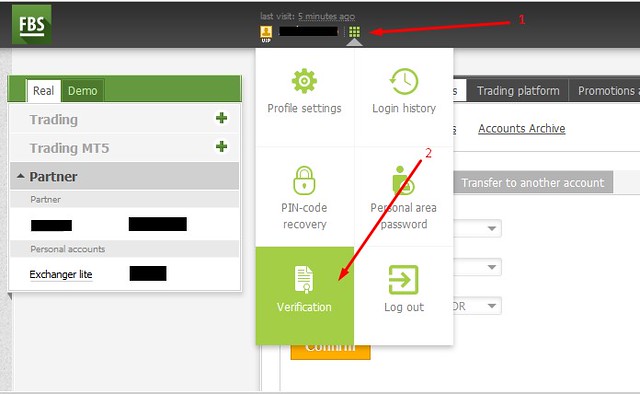
- Go to the “Verification” section in your Profile. This is the green button that appears near your name in the upper left-hand part of the screen after you have logged into your account (see image). Alternatively, you can follow a link provided for this purpose in your email or visit the link https://my.fbsidn.trade/users/profile-verification

- Fill in the necessary fields on the form. All information you provide must match the way they are entered into your official documents. For example, if your name shows as John Mack Doe on your international passport, it is not acceptable to enter it as Mack John Doe on the form. The information must be entered properly just the way it appears in your documents.
- Next, upload scanned copies of the relevant government-issued ID documents. These are color copies of your international passport, national ID card or drivers’ license and must contain your photo. Also attach a document which serves as a proof of address. This can be a bank statement or a utility bill. The document used as proof of address must be in any one of the following formats: ‘jpg’, ‘jpeg’, ‘png’, ‘gif’ or ‘pdf’. The files must not exceed a total size of 5MB.
- After attaching these documents, click the button which shows “Send request”. This submits the documents to the back office for processing and verification. The maximum time of consideration is usually 24 hours. If your request is declined, you will receive a notification to your e-mail address stating the reason of decline in your Personal area. This gives you the opportunity to rectify any anomalies detected.

It must also be stated that account opening and account verification can also be done by using your social media accounts. This takes away the stress of filling out the account opening forms online. Your basic information will be obtained in a process where the FBS account opening portal synchronizes with your profile on Facebook, Twitter, Google +, Microsoft and Yahoo! This will also serve as the login profile to your trading account after account opening and verification is completed.